1.Open your menu and locate the coupon you want to change.  How?
How?
a.On the toolbar, click the Find button,  type the name of the coupon, and then click OK to start the search. Matching entries are listed in a Search Results window located at the bottom of the Menu Designer window. type the name of the coupon, and then click OK to start the search. Matching entries are listed in a Search Results window located at the bottom of the Menu Designer window. b.Double-click on an entry in the search results window to be taken to that entry in the Menu Tree. |
2.Click the Application tab.
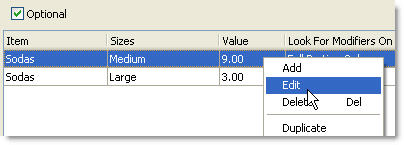
3.Right-click an Application Rule, and click Edit.
4.Right-click an Application Listed Item, and click Edit.
5.In the Value field, delete the current amount, and then type the new discount amount.
6.Click OK.
7.Click OK to close the Coupon Application Rule window.
See Also:
•Change a Coupon
•Add or Edit Coupon Applications
•Coupon Properties
•Create a Coupon
•Find a Menu Element